Your AirPods Pro 2 still work. The battery gets you through your commute, the noise cancellation does its job, and replacing them would mean paying again for something you already enjoy. That is the real starting point for an AirPods Pro 3 vs AirPods Pro 2 comparison.
Quick answer: keep a healthy pair of Pro 2 unless longer uninterrupted listening, stronger noise isolation or workout heart-rate tracking solves a problem you actually have. For a first-time iPhone buyer, the Pro 3 are our starting recommendation—provided the fit and current price make sense.
Research note: Decively has not hands-on tested these earbuds. This guide combines Apple documentation with attributed testing from RTINGS and What Hi-Fi?. The Pro 2 specification baseline is the 2023 USB-C version; older Lightning models differ. Specifications checked 1 October 2026. Affiliate disclosure.
AMAZON OPTION · AFFILIATE LINK
Check AirPods Pro 3 on Amazon
The linked option is AirPods Pro 3. This comparison also explains when keeping Pro 2 makes more sense. Check the current price, seller, delivery and return terms. As an Amazon Associate I earn from qualifying purchases.
AirPods Pro 3 vs AirPods Pro 2 at a glance
What changes
AirPods Pro 3
AirPods Pro 2 (USB-C)
Headphone chip
Pro 3: H2
Pro 2: H2
Listening, ANC on
Pro 3: up to 8 hours
Pro 2: up to 6 hours
Listening including case, ANC on
Pro 3: up to 24 hours
Pro 2: up to 30 hours
Tips supplied
Pro 3: five sizes, XXS–L
Pro 2: four sizes, XS–L
Earbuds and case protection
Pro 3: IP57
Pro 2: IP54
Workout heart-rate sensor
Pro 3: yes
Pro 2: no
Live Translation
Pro 3: compatible iPhone required
Pro 2: compatible iPhone required
Case tracking chip
Pro 3: second-generation Ultra Wideband
Pro 2: U1
Charging cable in original box
Pro 3: sold separately
Pro 2: USB-C cable included
Manufacturer-rated figures, not Decively measurements. Listening totals include the case, rather than adding the case figure to the earbud figure. Sources: Pro 3 specifications, Pro 2 USB-C specifications and Apple’s model comparison.
Noise cancellation: the clearest reason to upgrade
A noisy commute is a better reason to replace earbuds than a new model number. Apple claims the Pro 3 remove up to twice as much noise as the Pro 2 under its test conditions. That is a manufacturer claim, not a promise that every train carriage will sound half as loud. Apple’s announcement explains the test basis.
RTINGS’ own testing also found stronger overall isolation on the Pro 3, including better blocking of higher-frequency sound. That gives the upgrade a practical argument for frequent commuters. If you mainly listen in a quiet room, though, the benefit may be much less valuable to you.
Try the available ear-tip sizes before judging either pair. A weak seal can undermine the benefit of a better noise-cancelling system. Our recommendation is to buy through a seller whose return terms let you resolve a poor fit, rather than assuming the newer model will suit your ears.
The newer fit will not suit every ear
The Pro 3 use revised geometry and foam-infused tips, with an extra XXS option. More choice is useful, but it does not make comfort universal. What Hi-Fi?’s reviewers had differing preferences: some preferred the Pro 2’s shallower fit, while others found the Pro 3 more secure.
RTINGS describes the Pro 3 as a deeper-fitting design and reports a bassier, brighter presentation than the Pro 2. Those are attributed listening and measurement findings, not our own experience. If you enjoy the Pro 2’s sound and barely notice them in your ears, that is a good reason to resist an automatic upgrade.
Before deciding: consider comfort after an hour, not just whether the earbuds stay put for a minute. For in-ear headphones, an uncomfortable fit can outweigh a convincing specification sheet.
Battery life: longer sessions, fewer case top-ups
AirPods Pro 3 — up to 8 hours, ANC on
AirPods Pro 2 — up to 6 hours, ANC on
Bars show Apple’s maximum single-charge listening estimates with ANC enabled, on a common eight-hour scale. They are not results from a Decively battery test. Sources: Pro 3 / Pro 2.
Eight hours is useful. So is a longer-lasting case.
A longer session matters when taking the earbuds out to recharge is inconvenient. But the newer model does not win every battery comparison: Apple rates the Pro 3 at 24 hours including the case, versus 30 hours for the Pro 2. Neither figure is a guaranteed result; volume, settings and battery condition affect runtime.
Separate those two needs. For uninterrupted work or travel, our preference is the Pro 3. For several shorter sessions between opportunities to charge the case, the Pro 2 still have a useful advantage on paper. An ageing pair with reduced capacity may, of course, fall short of its original rating.
For Pro 3 workout use with heart-rate sensing, Apple lists up to 6.5 hours. Do not assume the eight-hour headline applies to every mode. Also budget for a USB-C cable if you do not already have one; Apple does not include it with the Pro 3.
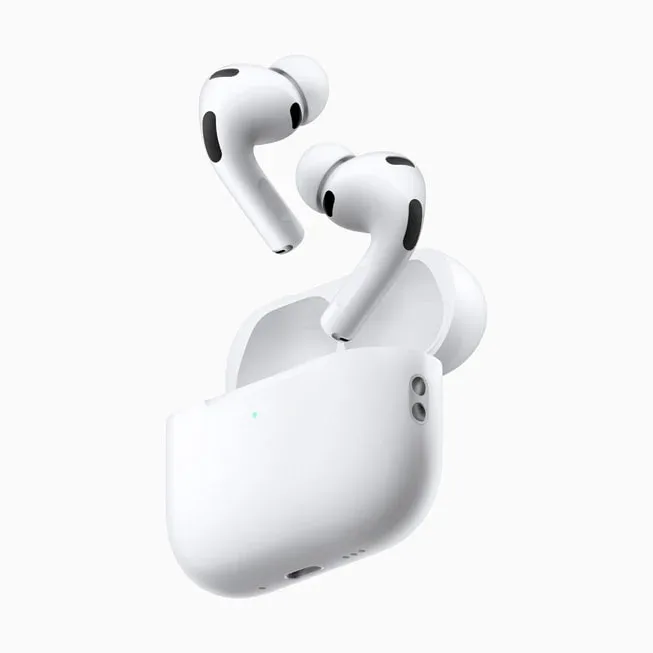
AirPods Pro 3 and their USB-C charging case. Official product image: Apple. Pro 2 are not pictured.
Heart-rate tracking: useful if it fills a gap
The Pro 3 add a heart-rate sensor for workouts and support tracking through Apple’s Fitness app on a compatible iPhone. The Pro 2 do not have that sensor. If you exercise with your iPhone but do not wear a watch, this could be a practical reason to choose the newer earbuds.
If your existing watch already supplies the workout information you want, ask what the earbuds would add to your routine. The sensor alone is a weaker upgrade argument in that situation. Feature requirements and subscription requirements are separate: check the app and workout features you intend to use, rather than assuming every Fitness+ service is included.
Apple lists IP57 for the Pro 3 earbuds and case, compared with IP54 for the USB-C Pro 2. That is an improved protection rating, not permission to treat them as swimming headphones. Follow Apple’s care instructions.
Live Translation is not exclusive to the Pro 3
You do not need to replace Pro 2 solely to get Live Translation. Apple’s current support documentation includes both generations. You need an Apple Intelligence-enabled iPhone, iOS 26 or later, current AirPods firmware, Apple Intelligence turned on and the Translate app. Language and regional availability still matter.
Both generations also offer Hearing Test and Hearing Aid features where supported. These services have their own eligibility and availability requirements; check Apple’s documentation for your country. They are not a reason to assume that Pro 2 have become obsolete.
For Android users, basic Bluetooth listening works, but Apple’s specifications warn that functionality on non-Apple devices can be limited. Our recommendation is to compare Android-friendly alternatives before paying for features built around an iPhone. See our noise-cancelling headphones guide for the wider decision.
Should you upgrade—or keep what you have?
Your situation
Starting recommendation
What to check
Pro 2 fit well and still hold a charge
Keep your Pro 2
Whether a specific limitation bothers you
Long, noisy commutes
Consider Pro 3
Comfort, seal and return terms
First pair for a compatible iPhone
Start with Pro 3
Current price and the exact seller
Workouts without a watch
Shortlist Pro 3
Fitness app compatibility
Large discount on new Pro 2
Compare the total saving
USB-C version, condition and warranty
Android is your main phone
Compare other earbuds first
Which Apple features you would lose
Our verdict: the Pro 3 are the more compelling starting point for a new iPhone buyer, while a satisfied Pro 2 owner can reasonably wait. There is no universal price gap at which upgrading becomes worthwhile. Compare the saving with the problem the newer pair would actually solve.
Before buying: compare the exact offer
Check the model name, seller, condition and return policy. This article compares the USB-C Pro 2; a Lightning listing is a different purchase. With discounted older stock, check warranty terms and whether the item is new, refurbished or used.
The Amazon link below is for the US store. International readers should check delivery eligibility, taxes, import charges and local warranty arrangements before treating the displayed price as their final cost. We have not labelled it the cheapest offer or copied a temporary promotional price.
For a broader checklist, see Decively’s buying-guide approach.
AMAZON OPTION · AFFILIATE LINK
Check AirPods Pro 3 on Amazon
US-store listing for AirPods Pro 3. Check the current price, seller, delivery and return terms. As an Amazon Associate I earn from qualifying purchases.
Decively may earn a commission from qualifying purchases through this link. The recommendation above includes reasons to keep the older model. Read our affiliate disclosure.
AirPods Pro 3 vs Pro 2: common questions
Are AirPods Pro 3 worth it if I own Pro 2?
Only if the improvements matter to your routine. Our strongest reasons to consider upgrading are noisy commutes, longer uninterrupted sessions and workout heart-rate tracking. A comfortable, reliable pair of Pro 2 remains a sensible choice.
Do AirPods Pro 2 support Live Translation?
Yes, with a compatible Apple Intelligence-enabled iPhone and the required software. Check supported languages and regional availability before buying for translation.
Which have better battery life?
Pro 3 have the longer rated single-charge listening time with ANC. Pro 2 have the longer rated total including their case. Choose according to how you actually recharge.
Sources and research method
We checked official specifications and feature requirements on 1 October 2026, and used independent firsthand testing to identify trade-offs that a product page can miss. Recommendations are Decively’s editorial interpretation of that evidence. This is a researched comparison, not a Decively lab test.
Apple: AirPods Pro 3 technical specifications
Apple: AirPods Pro 2 USB-C specifications
Apple: model comparison
Apple: Pro 3 launch and ANC test conditions
Apple: Live Translation requirements
RTINGS: firsthand Pro 2 vs Pro 3 testing
What Hi-Fi?: AirPods Pro 3 review and fit observations