The iPad A16 makes the most sense when you know what you want a tablet to do. Reading course PDFs, watching a series, joining a call and writing notes are good reasons to buy one. Hoping that a keyboard will turn it into your next laptop is a much less certain bet.
This iPad A16 review focuses on the 11-inch, 128GB, Wi-Fi model. It is a buying assessment based on official specifications, independent testing and attributed owner experiences. Decively has not hands-on tested this iPad. Research checked: 2 October 2026.
Affiliate disclosure: As an Amazon Associate I earn from qualifying purchases. The Amazon buttons are affiliate links. Read our disclosure.
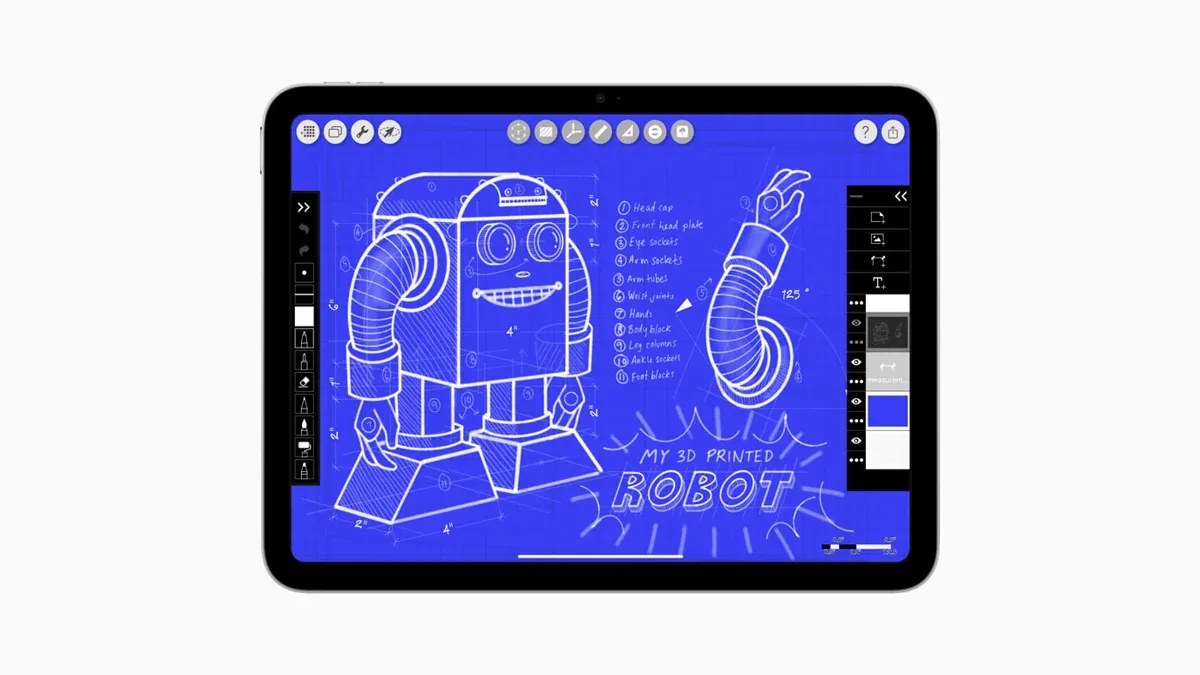
Image credit: Apple Newsroom. The official image shows the iPad A16 running Morpholio Trace; the application is illustrative, not a promise about included software.
Quick verdict: buy the tablet, not the upgrade ladder
BEST FOR
Everyday use and study alongside a laptop
A practical shortlist choice for browsing, entertainment, PDFs, handwritten notes and family use. The strongest argument is a sensible total purchase cost, not having the newest chip.
SKIP IF
Your work depends on a better drawing setup or Apple Intelligence
Look beyond this model if you want a laminated drawing surface, Pencil Pro, heavy creative workloads or Apple’s integrated AI features.
Biggest strength: enough performance for ordinary tablet work without paying for an Air. Biggest weakness: the screen and Pencil arrangement are the compromises you may notice every day. Main alternative: the current 11-inch iPad Air M4, particularly for regular pen users.
AMAZON OPTION · AFFILIATE LINK
Check the iPad A16, 128GB, Wi-Fi on Amazon
The linked configuration is Blue, 128GB, Wi-Fi. Check the selected model, seller, delivery and return terms. As an Amazon Associate I earn from qualifying purchases.
The specifications that matter before checkout
| Item | Specification |
|---|---|
| Model | iPad (A16), introduced March 2025 |
| Linked version | 128GB, Wi-Fi, Blue |
| Chip | A16: 5-core CPU, 4-core GPU, 16-core Neural Engine |
| Display | 11-inch marketed size; 2360 × 1640; 500-nit rated brightness |
| Unlocking | Touch ID in the top button |
| Connectivity | Wi-Fi 6; Bluetooth 5.3; USB-C with USB 2 data speeds |
| Cameras | 12MP rear; landscape 12MP Center Stage front |
| Weight | 477g for the Wi-Fi model |
| Apple Pencil | USB-C and first generation; first generation needs an adapter |
Source: Apple technical specifications. The A16 model was available from 12 March 2025. Apple’s launch announcement. It is not an M-series iPad, and the chip name does not mean it has exactly the same CPU/GPU configuration as every other A16 device.
The supplied link identifies US ASIN B0DZ75TN5F. During our check it redirected to UK ASIN B0DZ76CW2K as an exact match. Store routing can change: check the generation, storage and Wi-Fi selection before ordering. A Wi-Fi model does not include a cellular data connection.
The display is the compromise to think about first
The question is not whether the screen can show a sharp page. It is where you read and how often you write on it. Reflections by a window are more important to a commuter than a processor chart. The small separation between pen tip and image can matter more to a daily illustrator than to someone signing an occasional PDF.
Notebookcheck measured average brightness of 530.6 nits but a relatively low 531:1 contrast ratio, and criticised reflections and the non-laminated 60Hz panel. Tom’s Guide measured 506 nits and was more positive about the display overall. These are separate test results, not numbers to average into a new Decively measurement.
The useful agreement is that the display is a budget compromise. Neither brightness result makes it an ideal outdoor reading screen. If pen feel or reflections bother you in a shop, do not assume a faster chip will make that irritation disappear.
There is also a naming trap. Apple measures both this “11-inch” screen and the previous “10.9-inch” iPad at 10.86 inches diagonally as rectangles. You are not buying a meaningfully larger screen. Previous-generation specifications.
Performance: plenty for ordinary work, with some boundaries
A sensible routine is a lecture PDF next to notes, some browser research, a video call and a game afterwards. The buying question is whether those tasks fit your workflow; it is not whether a more expensive tablet can finish a benchmark faster.
Independent Geekbench 6 results were 2,566 single-core / 5,939 multi-core at Notebookcheck and 2,589 / 6,176 at Tom’s Guide. Different test versions and conditions prevent a perfect comparison, but the results are broadly consistent rather than evidence of a weak everyday processor.
For gaming, do not confuse running popular mobile games with getting every high-end iPad game or every graphics setting. Check the requirements of the titles you actually play. For regular large-file editing, the Air deserves attention; buying spare performance can make sense when time spent waiting is part of your work.
The connector is another boundary. Apple specifies USB 2 data transfer up to 480Mb/s. External-storage capacity is not the same thing as fast transfers. Think about that before choosing this iPad for a workflow built around large camera files. Apple’s port specification.
iPadOS and Apple Intelligence are separate buying decisions
At the research date, Apple lists the A16 iPad as compatible with iPadOS 27. It also supports Windowed Apps: older reviews describing only the original launch-era multitasking experience should not be your final buying reference. Current iPadOS compatibility; Apple’s Windowed Apps instructions.
That does not turn every desktop workflow into an iPad workflow. Check your essential app’s tablet version, file handling and keyboard behaviour. If a course or job requires specialist desktop software, keep the laptop budget intact until you have verified a workable alternative.
The A16 iPad does not support Apple Intelligence. Apple’s supported iPads include M1 and later models and iPad mini with A17 Pro; eligibility also involves software, region and language. Apple Intelligence requirements. An operating-system update does not remove this hardware limit.
That is different from being unable to use any AI service. A browser-based service is a separate product with its own requirements. Decide whether you need Apple’s integrated features specifically, rather than paying more because a product description mentions AI.
Is 128GB enough? Start with your offline habits
| Your routine | Buying direction |
|---|---|
| Streaming, browsing and cloud documents | Start by considering 128GB |
| PDFs and lecture notes with limited offline media | 128GB can be sensible; review your existing storage use |
| Several large games plus travel downloads | Consider 256GB for more breathing room |
| Large local media projects or a shared offline library | Evaluate 256GB/512GB and whether this is the right tablet at all |
These are buying guidelines, not guaranteed capacity calculations. Apps and downloads vary; the operating system uses part of the advertised storage. Leave space for updates rather than planning to fill every available gigabyte.
The model offers 128GB, 256GB and 512GB configurations. Apple’s storage announcement. Choose at purchase: do not budget on upgrading internal storage later. Cloud subscriptions and external storage have costs and workflow limits of their own.
Before choosing 256GB automatically, compare the full local prices of that model and an Air with the storage you need. The right upgrade may be a better screen and pen setup, not more space on the same tablet.
Battery, calls and travel: useful without an all-day guarantee
Apple rates Wi-Fi browsing or video playback at up to 10 hours. Apple battery specification. In controlled browsing tests, Notebookcheck recorded 10 hours 33 minutes, while Tom’s Guide recorded 11 hours 25 minutes at 150-nit brightness. Treat those as test scenarios, not a promise for a school day with maximum brightness and games.
Tech Dad’s one-year review describes more than eight hours of daily use, a useful note-taking experience and persistent glare. We reviewed its auto-generated transcript; those are the creator’s observations, not our measurements. His experience supports the everyday-use case without cancelling the screen trade-off.
For calls, the landscape front-camera position and Center Stage are more relevant than buying a tablet as your main camera. The rear camera is useful to consider for document capture; your phone may still be the more convenient camera you already carry. Apple’s camera and work overview.
Check local box contents and charging requirements. Adapter inclusion differs between markets; do not assume that a listing in another country describes your box. Add any needed charger to the total cost.
The Pencil choice matters more than it first appears
Apple Pencil USB-C is the straightforward option to consider for ordinary notes. It attaches magnetically for storage but pairs and charges by cable. It supports tilt but not pressure sensitivity. Apple Pencil feature comparison. Magnetic attachment does not mean magnetic charging.
The first-generation Apple Pencil supports pressure sensitivity, but this iPad needs the USB-C to Apple Pencil adapter. Apple’s Pencil comparison; iPad compatibility. Neither Pencil Pro nor the second-generation Pencil is supported.
For handwriting, that arrangement can be perfectly acceptable. For daily drawing, ask two questions: do you need pressure control, and will you resent managing a cable or adapter? A cheaper tablet is not automatically a cheaper setup you will enjoy using.
The owner discussion comparing A16 and Air contains both satisfied PDF/note users and an owner who preferred the Air M4’s laminated screen and Pencil Pro charging. These are individual accounts, not a survey. Their disagreement helps identify what to try in person: pen feel and charging convenience.
Magic Keyboard Folio is the Apple keyboard designed for this iPad; keyboard and Pencil are separate purchases. Apple accessory overview. Check exact model compatibility when choosing a third-party case. A keyboard can improve writing comfort without making a tablet app identical to its desktop version.
iPad A16 vs iPad Air M4: what the extra money buys
| Buying difference | iPad A16 | iPad Air M4 |
|---|---|---|
| Chip | A16 | M4 |
| Screen surface | Not fully laminated | Fully laminated; anti-reflective coating |
| Rated brightness | 500 nits | 500 nits on the 11-inch model |
| Pencil options | USB-C / first generation | USB-C / Pencil Pro |
| Apple Intelligence | Not supported | Supported, subject to Apple’s requirements |
| Decision | Everyday tablet at a sensible total cost | Pen comfort, integrated AI or more demanding work |
The current Air is the M4 model, available from 11 March 2026. It has 12GB unified memory. Air M4 announcement; Air technical specifications. Older reviews comparing the A16 only with Air M3 are useful historical evidence, not a complete current shopping comparison.
The 11-inch Air is not rated brighter than the base iPad. Its lamination and reflection treatment are the more useful display distinctions. Do not pay more expecting a brighter specification simply because the word “Air” appears on the box.
Choose the Air when the improvement solves a named problem. “I draw daily and want Pencil Pro” is a strong reason. “I mostly watch shows but might need more power someday” is a much weaker one.
What about an older iPad or an Android alternative?
A working tenth-generation iPad does not become unsuitable just because the A16 exists. The previous model uses A14 and started at 64GB. Apple’s older-model specification. If your current storage and performance are adequate, keeping it is the cheapest credible option.
For a new purchase, weigh the real saving on an older model against its storage, condition, warranty and remaining useful life. Do not treat a discounted older 64GB iPad as automatically equivalent to a new 128GB one. With a refurbished Air, verify the precise generation and battery/warranty terms; “Air” alone is not enough information.
For Android users, Samsung’s Galaxy Tab S10 Lite is a relevant comparison, with a 10.9-inch 90Hz display and an included S Pen. Samsung’s official introduction. Compare its local availability, app fit and complete setup price. An included pen can change value more than a small tablet-only price difference.
If most of your time will be spent reading novels, also consider whether an e-reader is the better device for that single job. A tablet’s flexibility is valuable only if you use it.
Who should buy the iPad A16?
STUDENTS
Good as a companion; verify course requirements
Start with PDFs, handwritten notes and calls. Keep a laptop available for required desktop software. Price the pen and case before deciding it is the budget option.
FAMILIES AND TRAVEL
A clear use case beats a speculative upgrade
Consider it for shared browsing, entertainment and calls. Allow for a protective case, offline downloads and a charging plan. Choose cellular separately if that is genuinely needed.
GAMERS AND CREATORS
Check specific apps before buying headroom
Check game and creative-app requirements. Regular large projects, pressure-sensitive drawing and demanding workflows are stronger reasons to consider an Air.
Strengths and trade-offs
| Reasons to shortlist it | Reasons to look elsewhere |
|---|---|
| Useful everyday performance | Reflections and a non-laminated screen |
| 128GB starting storage | No Apple Intelligence |
| Current windowed-app support | Pencil charging and compatibility compromises |
| Can avoid unnecessary Air spending | Accessories can undermine the budget advantage |
Is the iPad A16 worth it? Compare the whole basket
Do the simple calculation before checkout: tablet + the pen you need + keyboard, if necessary + case + any charger + recurring app or cloud costs. Then compare that basket with the alternative. A low tablet price and an expensive keyboard can be an awkward way to buy a typing machine.
There is no single fair worldwide price here. Retail offers, taxes, imports, delivery and warranty arrangements differ. We have not copied an Amazon price, customer rating or temporary deal into this article. Check the live offer and selected configuration in the store you reach.
Our verdict: shortlist the 128GB iPad A16 if your work is recognisably ordinary tablet work and the complete setup stays comfortably below an Air. Spend more when you can name the benefit you will use regularly. Keep an existing tablet when it already does the job.
For a broader decision framework, see Decively’s buying-guide approach and how we approach comparisons.
AMAZON OPTION · AFFILIATE LINK
Check the iPad A16, 128GB, Wi-Fi on Amazon
The linked configuration is Blue, 128GB, Wi-Fi. Check the selected model, seller, delivery and return terms. As an Amazon Associate I earn from qualifying purchases.
Decively may earn a commission from qualifying purchases through this link. Confirm A16, 128GB and Wi-Fi before ordering; local matches and availability can change.
iPad A16: common buying questions
Is the iPad A16 the eleventh-generation iPad?
It is commonly described that way. Apple’s product naming is iPad (A16); use the chip and configuration to identify the model, rather than an ambiguous “11-inch” listing.
Is the iPad A16 good for students?
It is a sensible companion for PDFs, notes and calls. Verify required course software before expecting it to replace a laptop, and include the Pencil in your budget.
Does the iPad A16 support Apple Intelligence?
No. Its A16 hardware is outside Apple’s supported iPad list. Ordinary browser-based AI services are a separate compatibility question.
Is 128GB enough for the iPad A16?
Often for a streaming/cloud-document routine. Several large games, offline films or media projects can change that answer. Check your current storage use rather than guessing.
Which Apple Pencil works with the iPad A16?
Apple Pencil USB-C and first generation are supported. The first-generation model requires an adapter; Pencil Pro and second generation are not supported.
Can it run multiple app windows?
Yes. Apple lists this model for Windowed Apps. This does not guarantee that a particular desktop workflow or app will work the same way on iPad.
Should I upgrade from the tenth-generation iPad?
Not just for the “11-inch” name. Upgrade when existing storage, performance or reliability is actually limiting you; keep a device that still meets your needs.
Is the iPad Air M4 worth the extra cost?
It can be for daily pen use, Pencil Pro, Apple Intelligence or demanding creative work. For basic browsing and entertainment, compare the real benefit with the whole-basket price difference.
Sources and editorial method
Research checked on 2 October 2026. This is secondary research, not a Decively hands-on test. Official specifications establish hardware and compatibility; independent reviewers supply attributed measurements. Owner comments illustrate individual preferences, not reliability statistics.
Apple: specs
Apple: product
Apple: launch
Apple: old
Apple: air
Apple: airlaunch
Apple: os
Apple: windows
Apple: ai
Apple: pencil
Apple: pencil1
Notebookcheck: independent laboratory review
Tom’s Guide: independent review and test results
Tech Dad: one-year review, transcript consulted
Reddit: owner discussion
Samsung: Galaxy Tab S10 Lite announcement
Amazon was used to check the destination’s product identity, not as a source of customer reviews or stable prices. How Decively approaches research.