Our TP-Link Deco X55 review focuses on the 2-Pack, which makes sense when your internet connection works well near the router but becomes unreliable elsewhere. Its appeal is straightforward: two compact Wi-Fi 6 units, one coordinated network and useful Ethernet connections.
However, buying mesh does not guarantee fast Wi-Fi in every room. This TP-Link Deco X55 review looks at the hardware, independent testing and practical limitations that matter before you order.
This is a research-based review using manufacturer documentation and independent reviewers’ testing. Decively has not conducted its own hands-on tests. Sources checked October 4, 2026.
TP-Link Deco X55 review: what you actually get
The standard Deco X55 is a dual-band AX3000 mesh system. This article covers the two-unit kit, not the X55 Pro or three-pack.
Wi-Fi: Wi-Fi 6 on 2.4 GHz and 5 GHz.
Advertised wireless rates: 574 Mbps on 2.4 GHz and 2,402 Mbps on 5 GHz.
Ethernet: Three gigabit ports per unit.
Operating modes: Router and Access Point.
Backhaul: Wireless or Ethernet connections between units.
Advertised coverage: Up to 4,500 square feet for the two-pack.
“AX3000” describes combined theoretical wireless rates. It does not mean one laptop receives a 3 Gbps internet connection. Likewise, the coverage figure is a manufacturer claim, not a guarantee for your walls and floor plan.
Is the Deco X55 2-Pack enough?
Think about the route between the two units before thinking about square footage.
The main Deco connects to your modem, fiber ONT or existing gateway. The second extends coverage from another suitable location. If their wireless connection must cross several dense walls, performance can suffer—even in a relatively small home.
Two units are a reasonable starting point when one additional coverage location addresses the problem. An awkward layout or multiple floors may require a different placement strategy.
Before buying, use our guide to fix weak Wi-Fi to establish whether coverage is actually the issue. Mesh cannot repair a slow internet connection that is already slow beside your router.
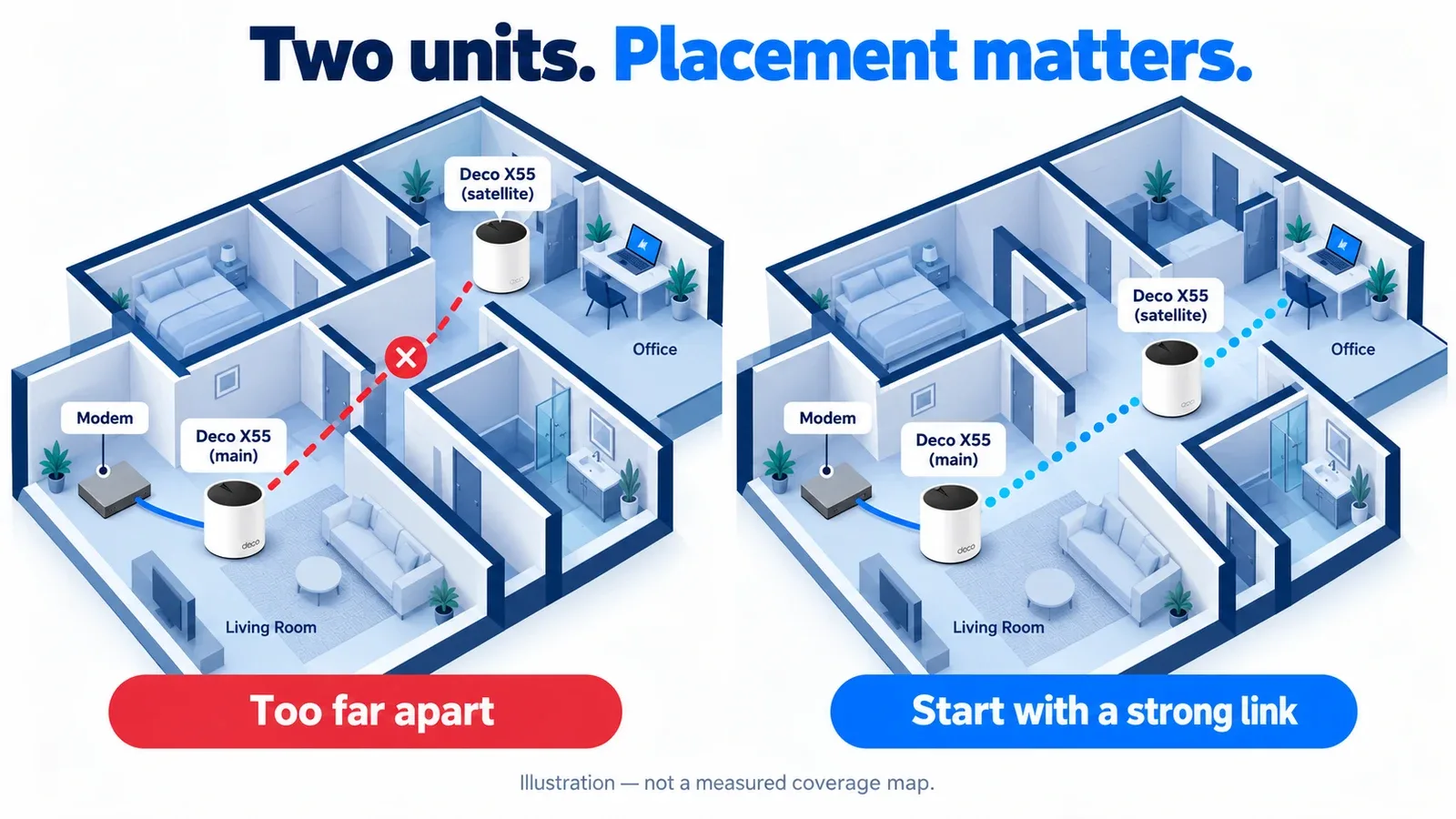
Placement illustration, not a measured coverage map. Start with a useful link between the main and satellite units, then test the room.
What independent Deco X55 testing tells us
HighSpeedInternet.com measured 739 Mbps at two feet from the main unit using an iPhone 12 Pro Max. Its three-node test recorded 373 Mbps at the third node in a dining room.
Those results demonstrate the distinction between strong performance near the main unit and reduced throughput elsewhere. They are not predicted speeds for your home.
Windows Central reported approximately 110 Mbps downstream in a distant office—close to its wired internet result. However, that setup also used three units, including an intermediate relay.
The useful conclusion is that placement and the connection between nodes matter considerably. Neither review establishes what the two-pack will achieve in your particular rooms.
Wireless backhaul is the trade-off to understand
The Deco X55 has no third wireless band dedicated to communication between units. With wireless backhaul, that traffic shares the available wireless resources with connected devices.
Our assessment: this is an acceptable compromise when your priority is usable coverage at a sensible purchase price. It becomes more significant when you expect demanding transfers or near-gigabit performance at the satellite.
Ethernet backhaul is worth using when your home already has suitable cabling. It removes reliance on a wireless connection between the Decos, although your devices’ Wi-Fi connections still have their own limitations.
Connecting a computer to the satellite’s Ethernet port does not automatically create a fully wired route to the router. The satellite may still use wireless backhaul.
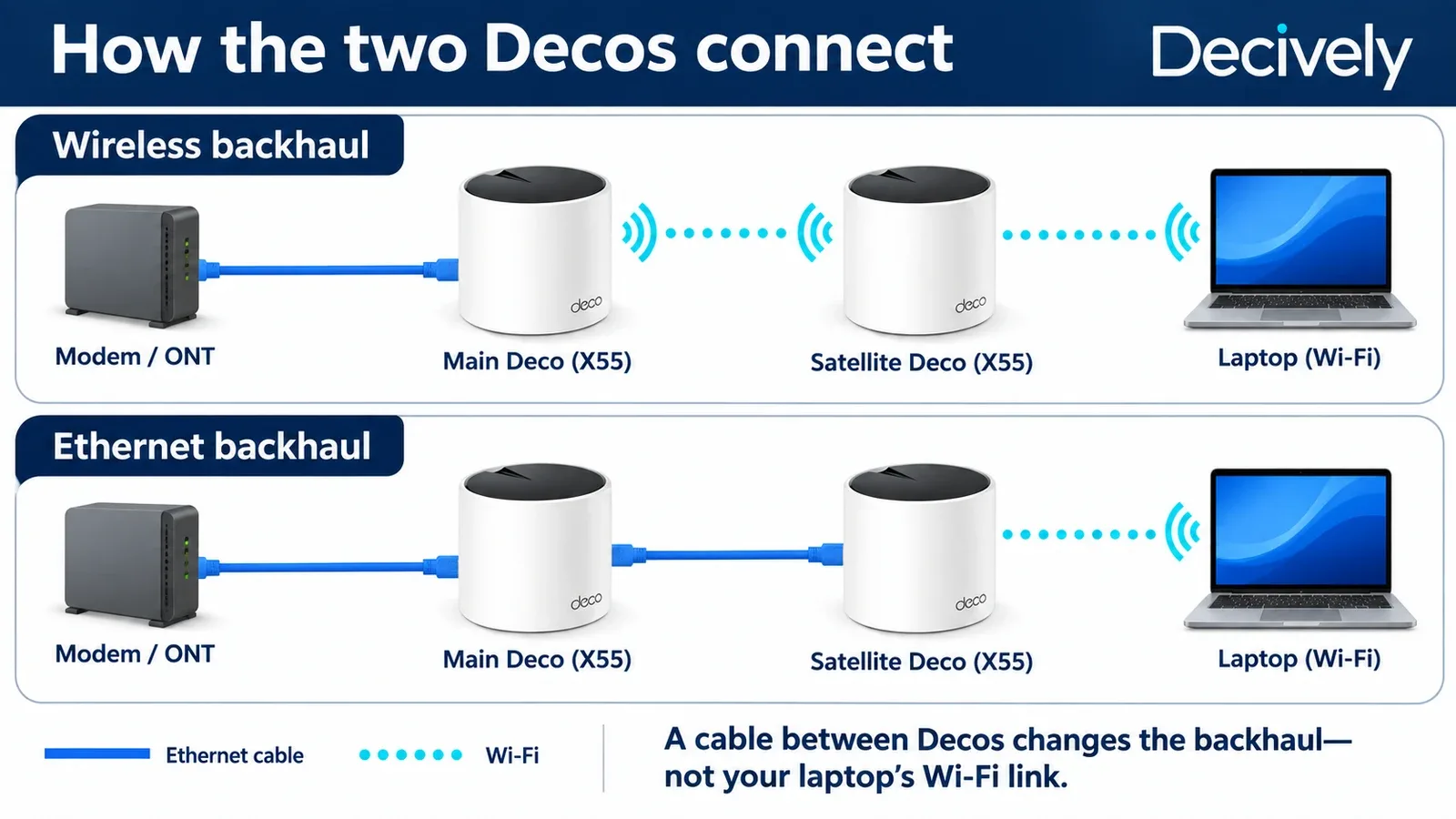
Connection illustration. The cable between the Decos changes their backhaul; the laptop shown still connects over Wi-Fi.
AVAILABLE ON AMAZON · AFFILIATE LINKS
Check today’s Deco X55 2-Pack offer
Check the current price, selected pack size, model, seller and return terms on Amazon. Price and availability can change.

TP-Link Deco X55 (2-Pack)
View price & availability on Amazon →As an Amazon Associate, Decively earns from qualifying purchases, at no additional cost to you.
Setup, subscriptions and existing routers
In this TP-Link Deco X55 review, setup is part of the buying decision. It uses the Deco app and a TP-Link ID. Independent reviewers found installation straightforward, but the account requirement matters if you prefer local administration.
Router mode: Deco manages your network.
Access Point mode: Your existing router remains responsible for routing.
Some router features are unavailable in Access Point mode, so check the functions you need before choosing it.
Basic Wi-Fi operation does not require a HomeShield subscription. Additional security and parental-control features can involve paid plans. Review the current feature list in the app rather than assuming everything advertised is included free.
The limitations that matter before buying
The standard X55’s gigabit ports make it an unsuitable choice if your goal is to deliver a multi-gigabit internet connection through the main unit. It also lacks a USB port for directly sharing a USB drive.
Check the exact hardware version and available firmware before relying on advanced features. Older reviews describe the software available during testing; they are not a complete guide to current firmware.
For this TP-Link Deco X55 review, the purchasing question is practical: can you position two units effectively, and are their connection limits appropriate for your internet plan?
TP-Link Deco X55 review verdict: buy for coverage
The Deco X55 2-Pack is worth considering for households that want straightforward mesh coverage, useful Ethernet ports and an option for wired backhaul.
It is less compelling if you need multi-gigabit connectivity, advanced local administration or guaranteed high speeds through difficult walls.
Start with diagnosis and placement. Our guide to fix weak Wi-Fi explains those checks before you commit to equipment.
Our view: the X55’s value depends on the current two-pack price and whether two well-positioned units solve your actual coverage problem.
AVAILABLE ON AMAZON · AFFILIATE LINKS
Choose the two-pack for the right layout
Check the current price, selected pack size, model, seller and return terms on Amazon. Price and availability can change.
TP-Link Deco X55 (2-Pack)
View price & availability on Amazon →As an Amazon Associate, Decively earns from qualifying purchases, at no additional cost to you.
Primary references
Manufacturer documentation supports the specifications; independent test results are attributed above and came from three-unit installations.
TP-Link — Deco X55 2-Pack specifications and coverage qualifications
HighSpeedInternet.com — Deco X55 benchmarks and testing methodology
Windows Central — Deco X55 hands-on review and three-unit installation
TP-Link — Ethernet backhaul setup and wiring rules
TP-Link — Router versus Access Point mode
TP-Link — Deco X55 documentation and firmware