Laptop not charging through USB-C? Start with these checks
If your laptop is not charging through USB-C, first connect its original charger directly to the charging-capable port. Remove the dock or hub and check the wall outlet. A USB-C socket can carry data without accepting laptop power, and a phone charger may be too weak even when its plug fits.
This guide draws on Microsoft troubleshooting guidance and manufacturer specifications; it is not a hands-on test of these accessories. As an Amazon Associate, Decively earns from qualifying purchases.
Change one part at a time. Try a known-working, manufacturer-approved charger and suitable cable, then reconnect any hub last. This makes it easier to identify the failed component without buying an entire new setup.
If there is no charging indicator, check the port and connection first. If charging starts but the battery percentage falls during demanding work, investigate the available power. If it stops at a repeatable percentage, consult your laptop’s battery-management settings before treating that behavior as a fault.
Check the laptop’s USB-C charging port
Look up your exact laptop model’s manual. Confirm that the selected USB-C port supports power input and note the recommended charger wattage and voltage. Port symbols can help, but the manual is the better compatibility check.
A laptop not charging from one socket may still charge from a different supported socket. Conversely, some laptops use USB-C only for peripherals or displays and require their original power connector. A larger USB-C charger cannot add a capability the laptop lacks.
Inspect the plug and socket for damage or a loose fit. Avoid pushing metal tools into the port. A damaged connector, persistent disconnects or signs of overheating need repair advice rather than another online purchase.
Match the charger’s Power Delivery output and cable
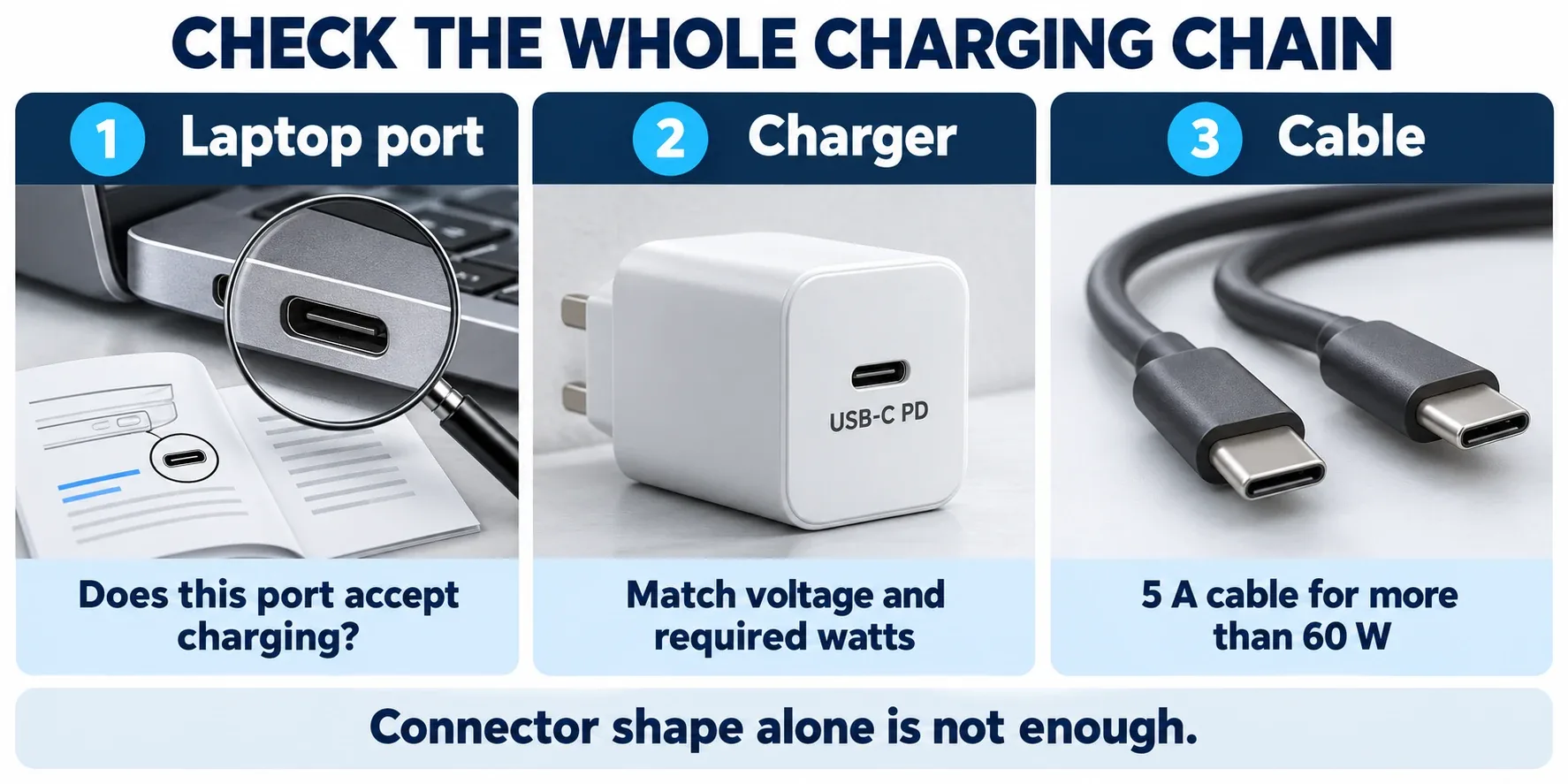
Illustration of the three checks: a charging-capable laptop port, a compatible USB PD charger and an adequately rated cable. Connector shape alone does not establish compatibility.
USB Power Delivery, or USB PD, lets compatible devices negotiate a supported power level. Check the charger’s individual USB-C output profiles, not just the largest number printed on its packaging.
For example, 20V × 3.25A equals 65W, while 20V × 5A equals 100W. The laptop must accept the relevant profile. A charger with more available power does not force all of it into a compatible laptop; however, wattage alone still does not guarantee compatibility.
For charging above 60W at 20V, choose an appropriately rated 5A USB-C cable with electronic identification, often described as an e-marked cable. A charging cable can support 100W while remaining unsuitable for a monitor: power, data speed and video support are separate specifications.
If a laptop not charging becomes reliable when you swap only the cable, a replacement cable is the sensible purchase. Keep the working charger.
Laptop not charging through a hub? Compare input and output
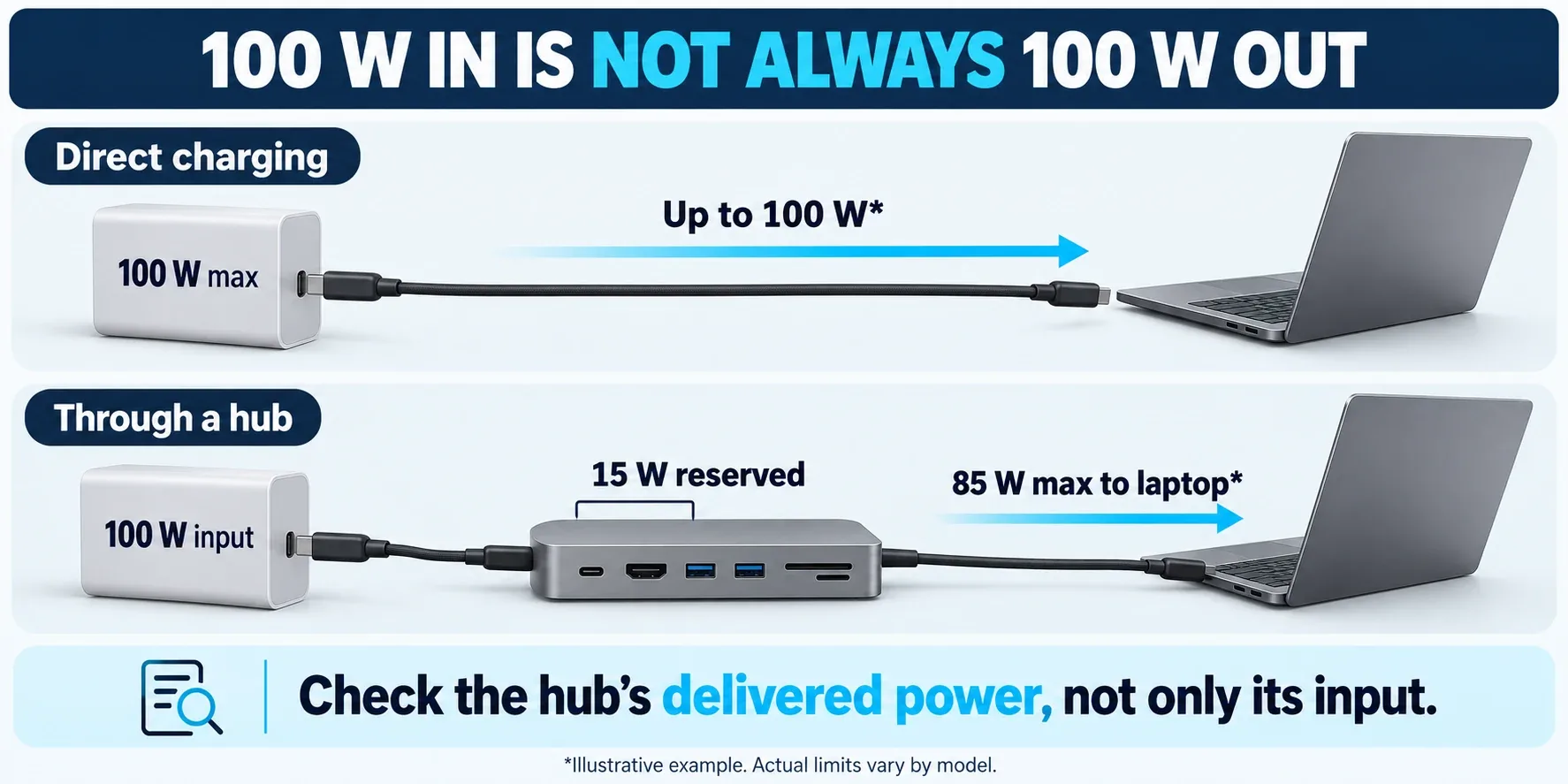
Illustrative example only: a hub may reserve 15W from a 100W input and offer up to 85W to the laptop. Check the stated pass-through output of your actual hub.
Try charging directly before blaming the laptop. A hub advertised with a 100W PD input may deliver less to the computer because it reserves some power for its own electronics and connected devices. Some docks require their own supplied power adapter.
That difference matters if your computer expects a full 100W supply. It can also explain a laptop charging slowly or losing battery during heavier work, even though the charging icon appears.
If you are planning a dock for extra screens, our guide to how to connect two monitors to a laptop explains display compatibility and charging limits. Check both before replacing the hub.
What to buy when a laptop is not charging
These three options address different faults. Confirm your laptop manufacturer’s USB-C requirements before ordering, and check the exact regional version, included accessories and return terms on the listing.
Anker 715 Nano II 65W: for compatible 65W laptops
The single-port A2663 offers up to 65W, including a 20V/3.25A output profile. It is a compact replacement option when the charger is the problem and your laptop supports this supply. A USB-C cable is not included. Pair it with a suitable cable; do not assume an old phone cable is adequate.
Anker 317 100W: when your supported laptop needs more power
The A2672 provides up to 100W through one USB-C port, including 20V/5A. The linked Amazon package includes a five-foot USB-C cable, so buying the separate cable pack is usually unnecessary. It is not a universal solution for laptops requiring 140W, proprietary charging profiles or higher power for full performance.
Anker 333 100W cable: replace a faulty or inadequate cable
The linked A8757 package contains two six-foot USB-C to USB-C cables. Anker specifies up to 100W charging, an e-marker and USB 2.0 data transfer up to 480Mbps. It does not support video output. Choose it when your existing charger is compatible and a cable swap has isolated the problem.
When buying a charger will not solve the problem
A laptop not charging with its original supply and a known-working compatible cable may have a battery, port or internal charging fault. Follow the manufacturer’s troubleshooting process and check warranty or repair options.
If your laptop charges while switched off but struggles during gaming or rendering, the power supply may be insufficient for that workload. Confirm whether the manufacturer permits USB-C charging at full performance or recommends its original higher-power adapter.
Do not replace several parts blindly. A persistent laptop not charging problem deserves a clear diagnosis: port capability first, then charger output, cable rating and dock limits.
USB-C charging questions
Can I charge a laptop with a phone charger?
Only if the laptop accepts its available USB PD output. A low-power phone charger may charge slowly, work only with the laptop off or fail to charge it. Use the laptop manufacturer’s recommended specification as your starting point.
Does a 100W cable make a 30W charger stronger?
No. The cable can carry an appropriate power level, but it cannot increase the charger’s output. The supported combination of laptop, charger and cable determines charging.
Should I buy a new battery first?
No. A laptop not charging does not automatically have a failed battery. Verify the charging path and settings first, then seek repair advice if the fault remains.
Sources and research
Specifications were checked against manufacturer documentation. Product packages and availability can differ by marketplace; explanatory diagrams illustrate concepts rather than measured charging results.
Microsoft: USB-C troubleshooting
Microsoft: charging slowly or discharging while plugged in
Anker: 715 Nano II 65W specifications